Sample
Learn about the serial entry action template - POS.

Sample (MU) records are linked to persons (PE). The item master (AR) is the copy info area.
The SerialEntry action (with name = Sample) is called via D_Sample (Quick Add (Samples)) in M_Appointments from person-related activity records.
Configuration Units
The Sample quick add page consists of the following configuration units:
- Page header
SerialEntryof header groupMU - Options form
SerialEntry.Sample.Options
The available filter buttons and default selection are defined via the
SerialEntry.SampleFilterWeb Configuration parameter. For further details, see SerialEntry.<Name>Filter.In addition the options form contains the fields Business Area (AZ:1) and Starts at (MA:0).
Totals formSerialEntry.Sample.Totals(shopping cart) - Search control from field group
AR.SerialEntryNote: The business logic determines which fields are copied from AR to MU. Therefore thecopySourceFieldsandcopyTargetFieldsaction parameters are not used for the Sample quick add page. - List header
SerialEntry.Listfrom header groupMUcontaining a (Delete) and
 (Duplicate Row) button. For further details, see DuplicateRow.
When duplicating MU rows the values for Issued and Send are not copied.
- List control from field group
MU.SerialEntrydefining the items list and the popup list:
The Available Quota field is recalculated based on the definition in the Sample Code info area (MK) every time the user enters quantities in Issued or Send.
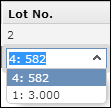
Use the Quota exceeded configuration parameter (Sample category) in the Configuration info area (MC) to determine whether users can exceed the available quota, see Configuration Info Area in the CRM.Core Administrator Guide. If Quota exceeded is unchecked, values that exceed the available quota cannot be saved and a message is displayed.For the Lot No. field a special widget is used, displaying the available lots and their quantities in a drop-down list as <LotNo.>: <Quantity>.
If the quantities should not be displayed, set the Lots without quantities configuration parameter (Inventory category) in the Configuration info area (MC).
- MiniDetails control from field group
MU.SerialEntry: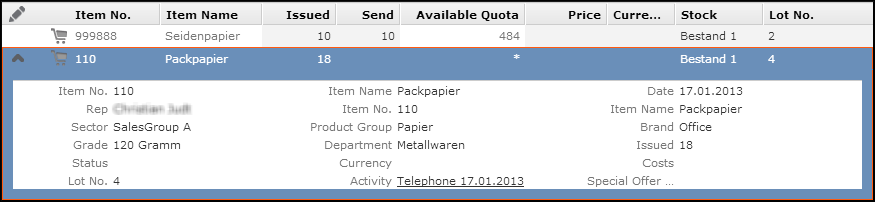
- No Related Data area is configured for the Samples quick add page.