Serial Entry Function for Leads
Use the serial entry function to add multiple leads one after another, e.g. at a trade fair.
Do the following to add multiple leads:
- Select
 (Sales) > Leads from the menu, start
the search and click on
(Sales) > Leads from the menu, start
the search and click on  (Serial Entry).
The input mask for new leads is displayed at the top of the page. A list of the most recently added leads is displayed below the input mask.
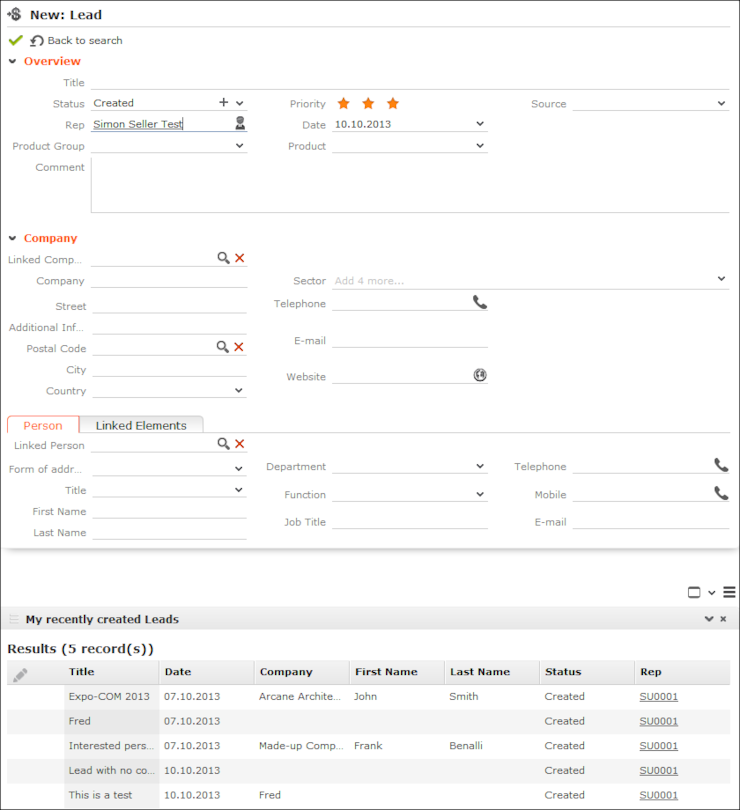
- Enter information on the lead.Note: You can define default values that are entered in all leads. To define default values, select (Sales) >
Leads from the menu, start the search and click on
 (Default
Values, see Default Values. Define default values
for the title and campaign to quickly enter leads, e.g. at a trade fair. You cannot
override fields that are entered automatically (Status,
Date, Rep) with default
values.
(Default
Values, see Default Values. Define default values
for the title and campaign to quickly enter leads, e.g. at a trade fair. You cannot
override fields that are entered automatically (Status,
Date, Rep) with default
values. - Click Save. The input mask for the next lead is displayed.
- Click on
 (Back to search) to return to the lead search.